Transcript-first rough cuts.Speakers, labels, one-tap cleanup.

Upload once. Scripta lays a diarized transcript beside playback so you can name speakers, mark lines, and bulk-remove a whole voice—without scrubbing into the dark.

  • Speaker detection you assign by ear, not guesswork.
  • Label-driven edits: tag what stays, cut what doesn't.
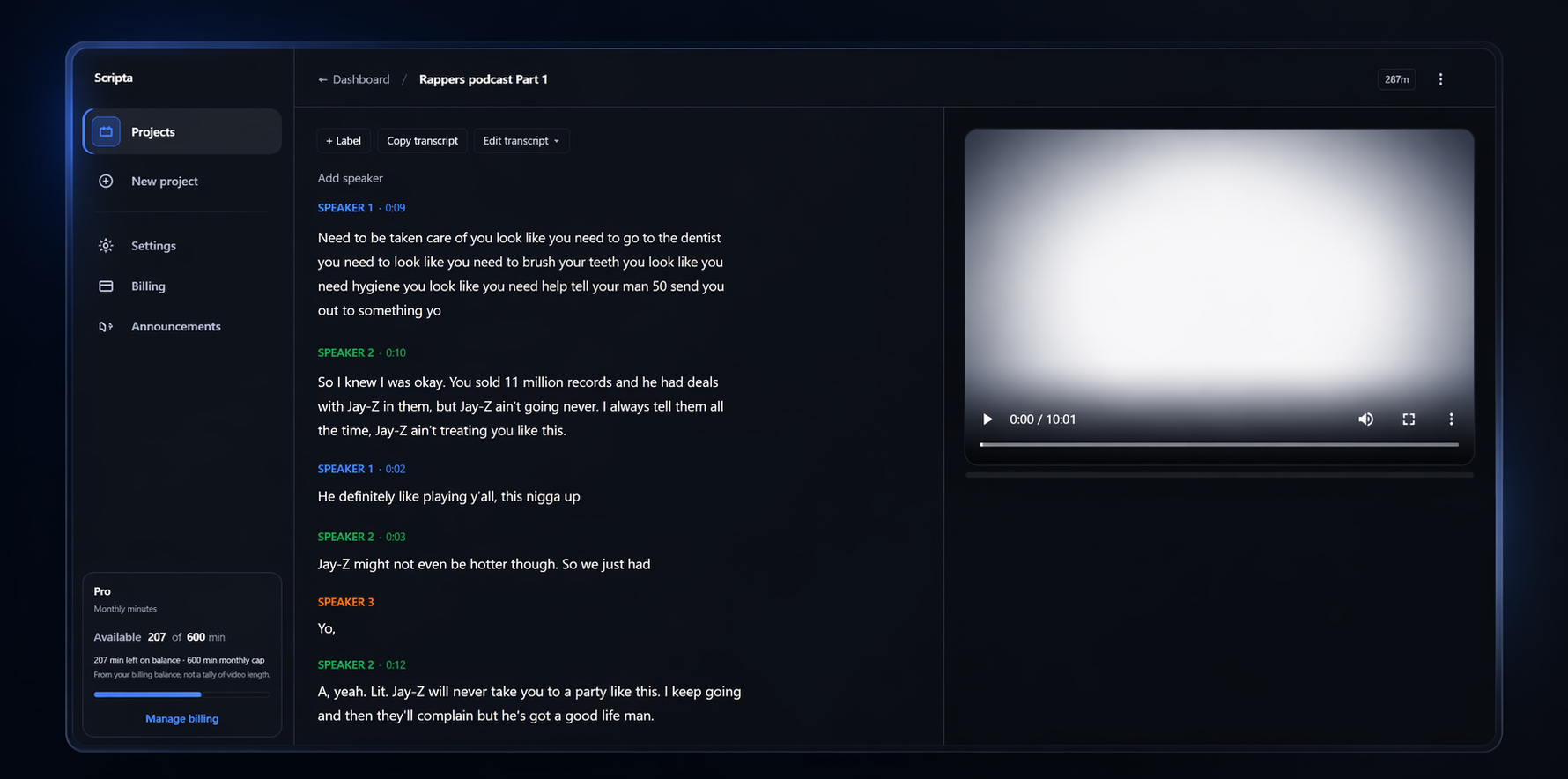
Scripta editor: transcript with labeled speakers and video preview

Transcript and player stay in sync—jump, label, edit in one surface.

Transcript-first editing

  • Diarized speakers
  • Segment labels
  • Bulk speaker delete

The cut you want is already in the transcript—you need it legible enough to act on once.

Scripta is built around that: fewer blind scrubs, fewer repeat passes, more decisions from the words on the page.

Early access

What beta editors keep saying

Paraphrased notes from private testers—podcasts, interviews, and solo video—who wanted the edit to follow what was said.

I stopped living inside five minutes of waveform. The transcript is where I decide what stays.

Creator · YouTube, long-form

Speaker lanes plus bulk delete turned ‘clean up this guest’ from an afternoon into a pass.

Producer · Interview podcasts

Identities anonymized; quotes edited for length. Not a statistically audited sample.

The problem

Spoken video is slow to edit without a transcript you trust.

  • Hunting moments

    Scrubbing back and forth to find the right sentence burns time—especially past the twenty-minute mark.

  • Removing whole stretches

    Cutting filler or an off-topic block shouldn’t mean guessing from a waveform about what was actually said.

  • Repeating the same pass

    Without a readable transcript, you re-open the same decisions instead of moving the cut forward.

Where time goes

80%

of rough-cut time is navigation and second-guessing—not the creative call.

ScrubbingRe-listeningRe-cutting

What you get

A small surface area, tuned for transcript-first rough cuts.

  • 01

    Diarized speakers

    Speech lands as ordered segments with a speaker on each line—so you see who said what before you cut.

    Shape of the transcript

  • 02

    Names that stick

    Rename detected speakers for the edit; the transcript stays readable while you work the cut.

    Shape of the transcript

  • 03

    Labels on segments

    Tag hooks, tangents, mistakes, or chapters on the lines themselves—not on a separate sticky note layer.

    Shape of the transcript

  • 04

    Bulk delete by speaker

    Select speakers and remove their lines in one guarded action—fast cleanup without touching the rest of the transcript.

    Shape of the transcript

  • 05

    Trim toward labels

    When you need a shorter master, plan the trim from the segments you already marked—one export path from labels to file.

    Shape of the transcript

In the app

Screens from the shipping product—speaker assignment and guarded bulk delete.

The hero above shows the full editor. Below is the rest of the workflow, at native capture resolution.

Speaker detection

Find who's speaking

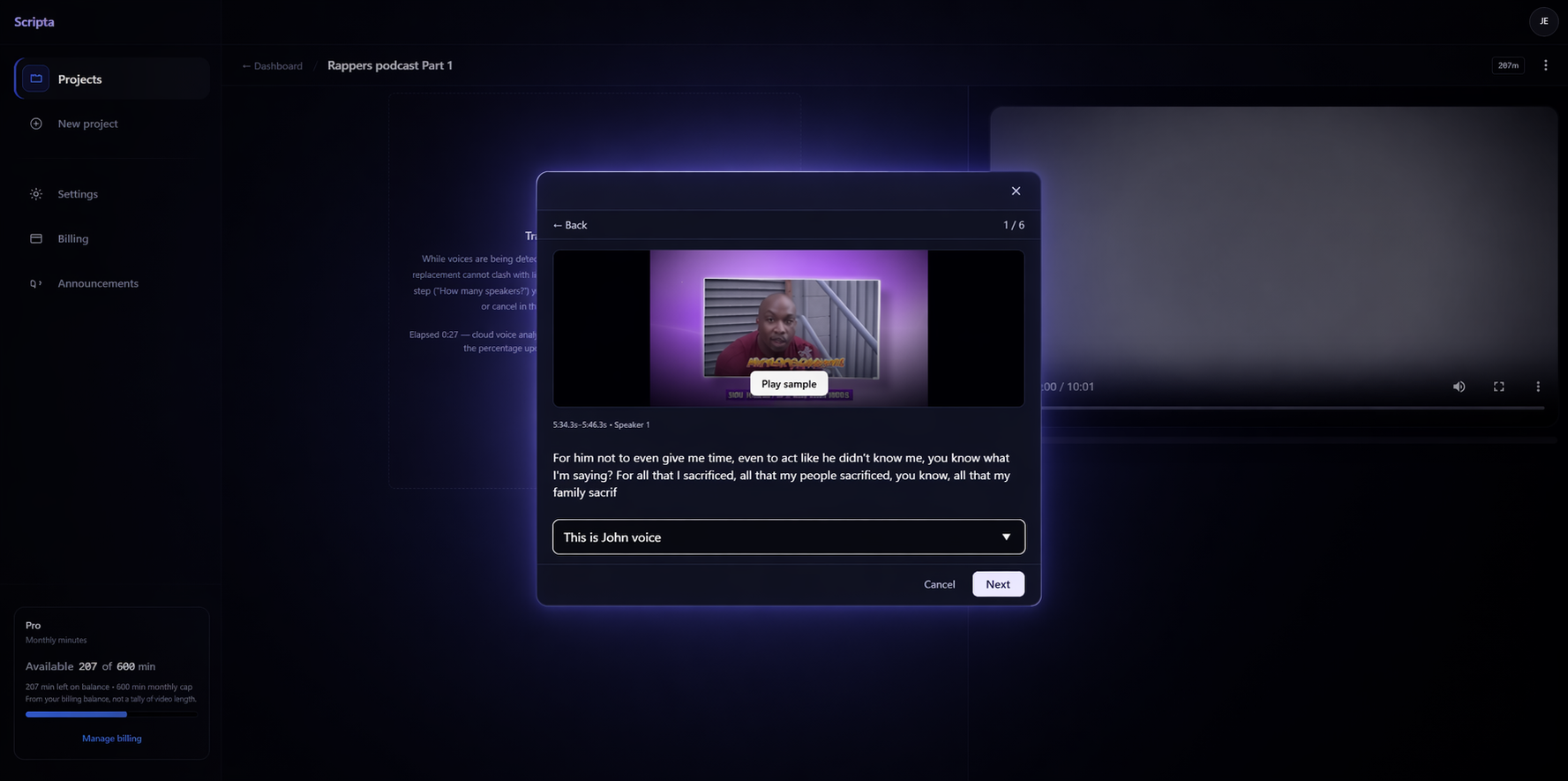
After upload, Scripta splits the transcript by voice. You listen to short samples and name each speaker—so the document matches how people actually talked.

Speaker detection: assign a voice sample to a speaker

Assign samples until every line carries the right speaker name.

Clean up

Remove a whole voice

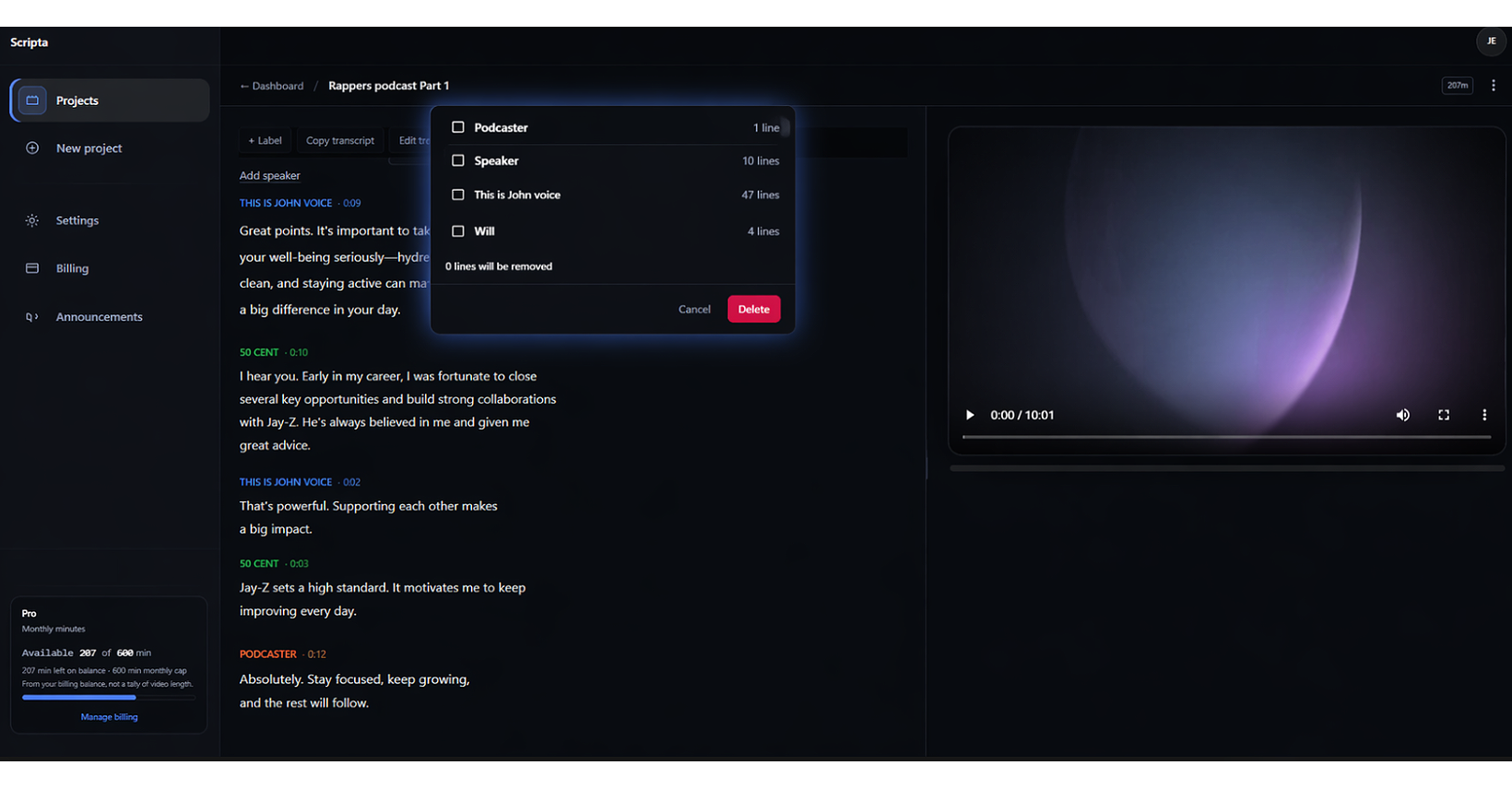
Pick speakers and delete their lines in one guarded step—no hunting line by line when someone shouldn't be in the cut.

Remove all lines from selected speakers in one confirmation step

Confirmation keeps bulk deletes deliberate, not accidental.

How it works

Four steps from upload to export.

Desktop reads left to right; mobile stacks the same order—one path, no buried menus.

Upload

Drop your file. We store what we need for transcript, preview, and export paths you pick later.

MP4

Transcript

Speech becomes ordered segments with speakers you can rename before you touch the cut.

Label

Mark hooks, tangents, mistakes, or chapters on the lines—not on a side channel you forget.

Cut

Export

Build a new file from the labels and speaker actions you used. Your original upload stays until you replace it.

.mp4

When it helps

Honest fits—not a promise to replace your whole stack.

  • Talking heads

    Strip filler and dead air without hunting frame by frame.

  • Long takes

    Mark hooks or key beats with labels, then trim the file to what you marked.

  • Tutorials

    Label what stays, remove what doesn't—move faster through dense material.

  • Interviews

    Sort by speaker first, then cut by labeled topic when the conversation jumps.

Pricing

Minute pools you can compare in one glance.

Plans bill in transcription minutes per month. Each transcribe (or re-transcribe) deducts from your pool based on the length of media we process. Unused minutes do not roll over unless noted in billing settings.

Trial

Free trial

$0/ one-time preview

2min

Maximum short-file transcription for first run

  • 1 project, 1 upload, up to 2 minutes
  • Transcript + speaker detection + naming workflow
  • No export - paid plans unlock minutes and deliverables
Start free trial

Starter

$10/ month

300min

Included transcription minutes each cycle

  • 300 transcription minutes / month
  • Diarized transcript, speakers, labels, bulk speaker delete
  • Transcript-first workflow; uploaded video not retained for preview on our side
Start on Starter
Most popular

Pro

$25/ month

1,000min

Included transcription minutes each cycle

  • 1,000 transcription minutes / month
  • Everything in Starter, plus retained video for in-app preview and export
  • Priority transcription queue
  • Built for weekly uploads and iterative rough cuts
Start on Pro

Studio

$49/ month

2,500min

Included transcription minutes each cycle

  • 2,500 transcription minutes / month
  • Everything in Pro with the highest standard-plan minute cap
  • For agencies and heavy interview volume
Start on Studio

Overage and add-on packs surface in-app before you hit a hard block. Taxes may apply by region.

FAQ

Straight answers—before you pay.

What kinds of video work best?
Clear speech—podcasts, interviews, tutorials, vlogs. Heavy music, wind, or people talking over each other makes any transcript harder; we say that upfront.
Can I rename detected speakers?
Yes. Internal speaker ids stay stable; you set the display names you want while you edit.
Can I remove everything that shares a label?
Yes. Tag segments (or stretches), then run one action to remove everything with that label.
Do I need pro editing experience?
If you can read a transcript and decide what to keep, you are most of the way there. Scripta is not a full NLE replacement.
Does this replace Premiere / Resolve / Final Cut?
No. It is for transcript-first rough cuts and cleanup. Finish polish wherever you already like.
How do exports work?
Exports are built from your labels and actions—you download a new file from the parts you chose without overwriting your upload.

Start from the transcript—not the timeline guesswork.

Create an account, open a project, and judge the workflow on your own footage. The surface area stays small on purpose.